No. VS Code's Remote-SSH extension has no setting to stop a developer downloading files from the remote host, and the requests to add one have been closed as not planned or left open. code-server, the browser version of VS Code, has a flag that removes its download menu. Neither stops the copy that matters, because a developer who can read a file over SSH can copy it out many other ways.
The requests
| Request | Where | What happened |
|---|---|---|
| "Disable download in remote SSH" | vscode-remote-release, issue 7106, August 2022 | Closed as not planned |
| "Remote SSH Extension - Disable File(s) Download from server option" | Issue 7534, November 2022 | Closed as not planned |
| "Remote SSH Extension - Disable File(s) Download from server option" | Issue 10488, November 2024 | Open |
The author of the open request concedes the larger point in the request itself: copying and pasting text from an open file is always possible.
What does exist
code-server, which serves VS Code in a browser, documents a flag: "You can pass the flag --disable-file-downloads to code-server". It removes the download action from the browser editor. It came from an issue filed in December 2020, where the same objection was raised: the file can still be fetched another way.
Codespaces has no such setting either. GitHub's security page for Codespaces says: "Codespaces are allowed to make outbound connections to the internet."
Why the download button is the wrong thing to close
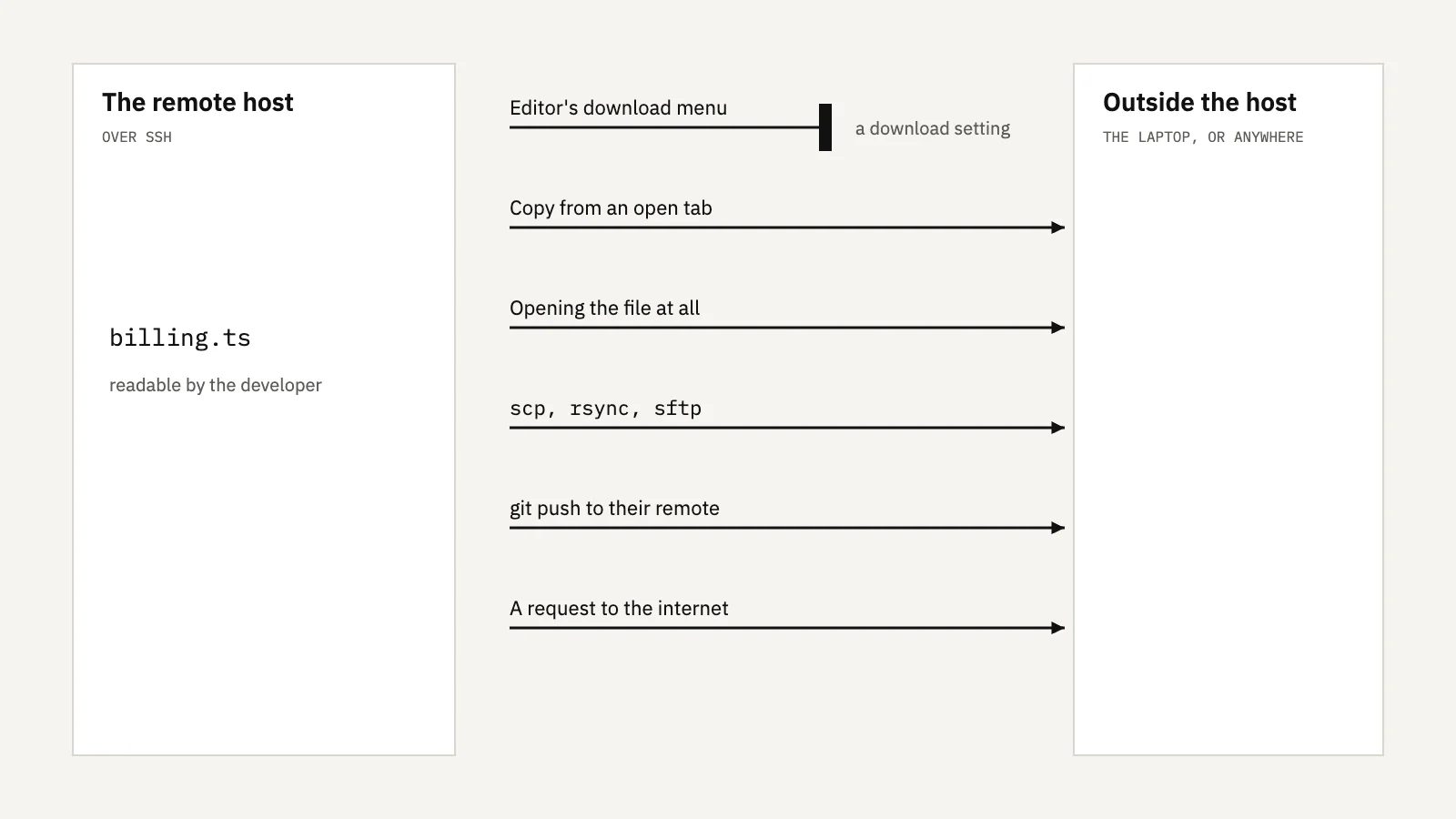
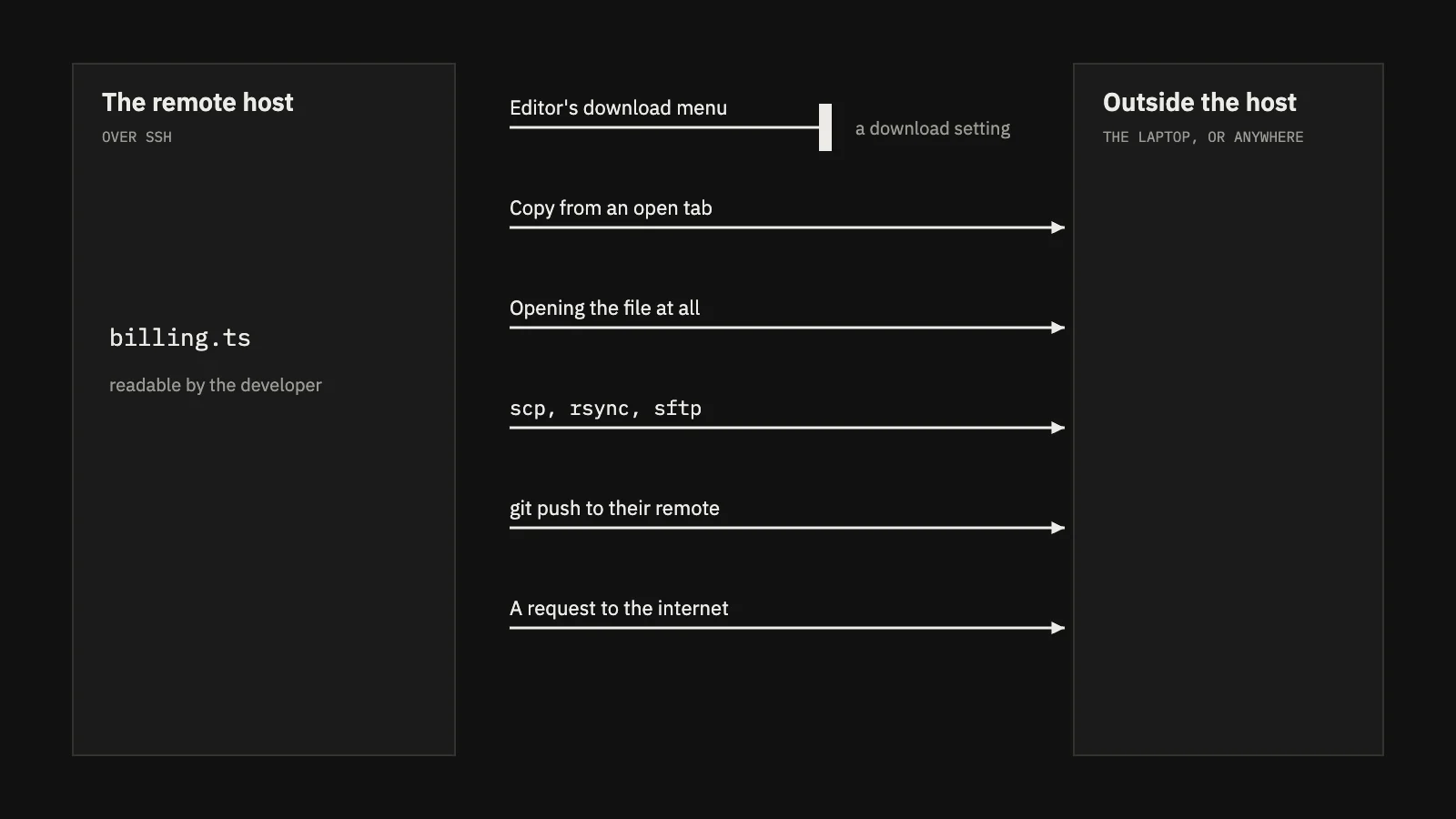
A developer connected to a remote host over SSH can read every file their account can read. From there a file can leave by:
- the editor's download menu;
- copying from an open editor tab;
scp,rsyncorsftpover the same SSH connection;git pushto a remote of their own;- a request to any host the machine can reach.
Closing the first leaves the other four. And the editor needs to read a file to show it, so the file is already on its way to the laptop when the developer opens it.
What changes the risk is which files the developer can read at all, and whether the machine can reach the internet. If a file is not readable on their side of the host, there is nothing to download, copy or push.
What teams do instead
| Approach | What it changes | What it costs |
|---|---|---|
| A virtual desktop with clipboard and file transfer turned off | Only pixels reach the laptop | Developers work through a remote screen |
| A cloud workspace with outbound traffic limited | Files cannot be sent to the internet | The developer can still read and retype everything |
| Splitting the repository | The developer's host holds only their part | Their build runs against stand-ins |
| Code masking | The developer's side of the workspace holds only the task's files; the build has all of them | A product to run |
Where Occlude fits
In Occlude, a developer connects VS Code over SSH to a workspace in your cloud. Their side of it holds the files their task needs; the rest is not there, while the build still reads it. Outbound traffic from the workspace is denied by default, and there is no clone on the laptop.
The files they may read do reach their editor, as they must for anyone to work on them. Occlude does not pretend otherwise; it makes that set small. VS Code has the setup, and Where your code goes sets out every route.
Sources
Each page last read on 28 November 2026.
- vscode-remote-release, issue 10488, issue 7534 and issue 7106.
- code-server FAQ and code-server issue 2426.
- Security in GitHub Codespaces.
Want to go through this for your codebase?
Or write to contact@occludehq.com
Not ready to talk? Step through a session on a sample repository