No. Git has no way to let someone read one folder of a repository and not another, and GitHub, GitLab and Bitbucket do not add one. On all three, read access is granted per repository. Every finer rule they offer controls who may write, not who may read.
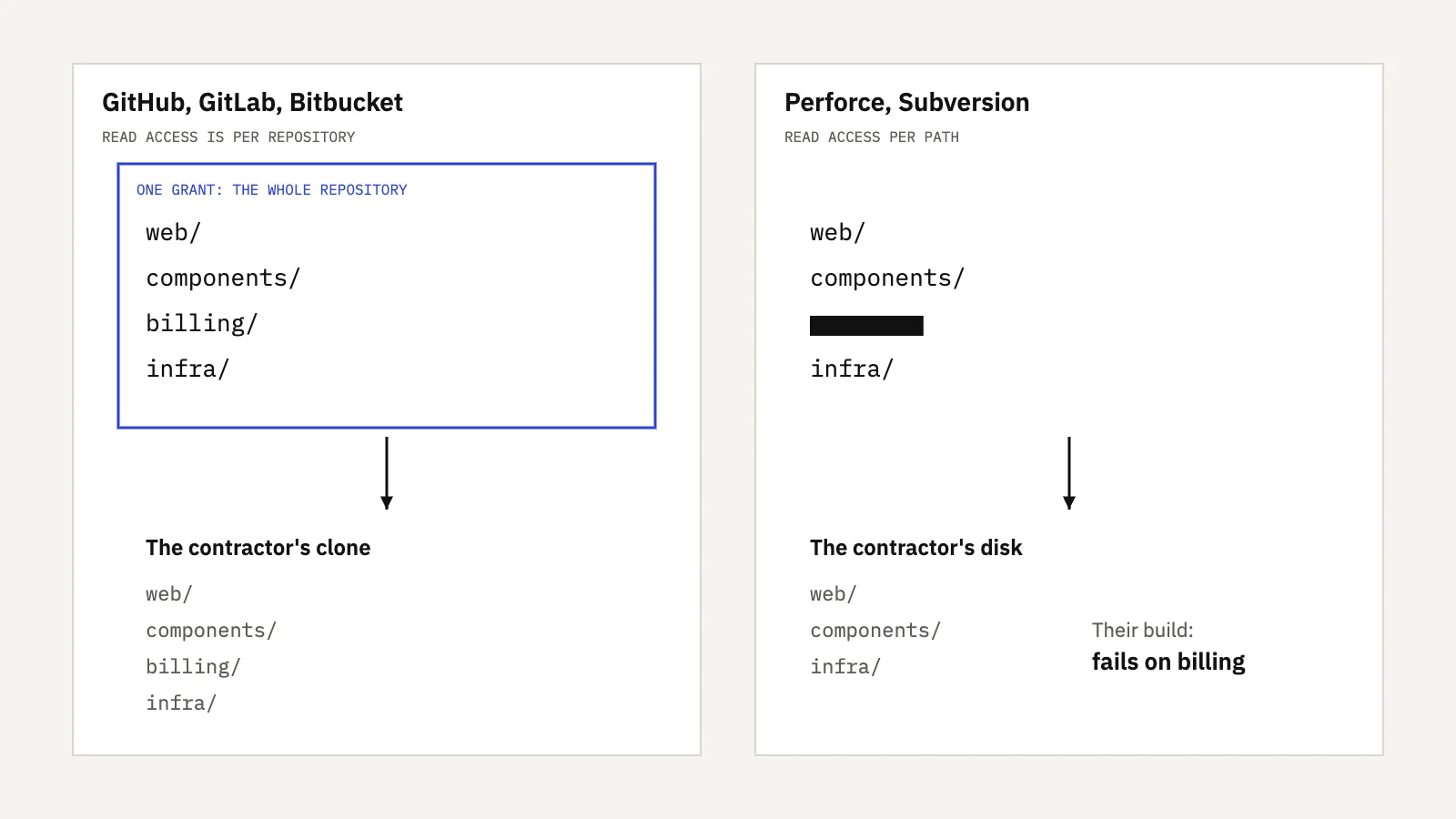
This page shows what each host documents, which version control systems do restrict reads by path, and what that costs.
Why Git works this way
A Git clone is a full copy of the repository and its history. The server's only decision is whether to hand that copy over. Once it has, there is no server left between the person and the files.
One of the most active answerers of Git questions on Stack Overflow put it in a sentence, replying to someone who wanted a contractor to see part of a monorepo:
"Git itself has no authorization (or authentication for that matter)."
Hosts add accounts and roles on top, and they add them at the level Git gives them: the repository.
What each host offers
| Host | Smallest unit for read access | Finer rules it does offer | What those rules control |
|---|---|---|---|
| GitHub | The repository | Branch protection, rulesets, code owners | Who may push, merge or must review |
| GitLab | The project | Protected branches, push rules, code owners | Who may push, merge or must review |
| Bitbucket Cloud | The repository | Branch permissions | Who may write or merge to a branch |
GitHub. Access is a role on a repository. The lowest role, Read, is described as "Recommended for non-code contributors who want to view or discuss your project", and the same table shows every role, Read included, able to pull the repository. Nothing in the role table is scoped to a path.
GitLab. Roles are held on a project or a group. The permissions table lists "Pull project code" as a project permission, and protected branches are described in terms of who can push and who can merge.
Bitbucket Cloud. The documentation defines the Read level in one line:
"Allows users to view, clone, and fork the repository code but not push changes."
Its branch permissions let an admin "Closely control which users or groups can write or merge to any branch." Again, writing.
So on all three, the answer to "can this person read billing/" is the same as the answer to "can this person clone the repository".
What about sparse checkout and partial clone?
They are for speed, not secrecy. Git's manual describes sparse checkout as a way to "Reduce your working tree to a subset of tracked files". It changes which files appear in your folder. It does not change which files you are allowed to fetch, and the person can widen it whenever they like.
Partial clone is the same kind of tool. Git's documentation calls it "a performance optimization": some files are not downloaded until they are needed, and anyone with read access can fetch them when they are.
Systems that do restrict reads by path
Two long-established systems can deny one user the right to read one path.
| System | Read control by path | What the user gets | What happens to their build |
|---|---|---|---|
| Perforce | Yes, in the protections table | Denied files never sync | Fails where their code depends on a denied file |
| Subversion | Yes, path-based authorization | Unreadable directories are left out of the checkout | Fails the same way |
Perforce's command reference says of the read right: "If this right is denied, users cannot use p4 print, p4 diff, or p4 sync on files." Subversion's manual says an unreadable subdirectory is "skipped altogether", and the same chapter carries a section titled "Do You Really Need Path-Based Access Control?"
Both do what they say. The file is not on the person's machine. Neither offers anything for the compiler on that machine, which now cannot find a file the code imports.
What people do instead
If you are on Git and need someone to see only part of your code, the realistic choices are these.
- Split the repository so that the boundary you need is a repository boundary. This is the standard answer and, where the code divides cleanly, the right one.
- Move the work to a cloud workspace so that no copy reaches the person's laptop. They can still read every file while they work.
- Move to Perforce, if broken contractor builds are acceptable.
- Use code masking, where the person works in a workspace that shows them part of the repository while the build uses all of it.
How to give a contractor access to part of a repository compares these side by side.
Where Occlude fits
Occlude gives contractors and AI agents partial repository access, which we call code masking. Your repository stays on the host you already use. Occlude runs in your cloud, holds the clone there, and decides what each person can see, while the compiler, the tests and the dev server see every file. Occlude is new. How a build runs shows a contractor building code they cannot read.
If your repositories already divide along the line you need, you do not need it. Repository permissions do that job for free.
Sources
Each quotation was read on its source page on 28 November 2026. The Stack Overflow quotation is its author's view.
- Repository roles for an organization, GitHub Docs
- Roles and permissions, GitLab Docs and Protected branches
- Grant repository access to users and groups, Bitbucket Cloud and Use branch permissions
- git-sparse-checkout, the Git manual and Partial Clone, Git documentation
- p4 protect, the Helix Core command reference
- Path-Based Authorization, Version Control with Subversion
- Stack Overflow: Granular access to directories within monorepo
Want to go through this for your codebase?
Or write to contact@occludehq.com
Not ready to talk? Step through a session on a sample repository