An AI coding agent can read whatever the machine it runs on can read. Copilot and Cursor offer exclusion settings, and their own documentation says those are not a hard boundary. Claude Code can deny reads at the operating system level, which is a real boundary, and like any read denial on one machine it keeps the files from the build as well. The reliable way to keep an agent out of part of a codebase and still build is the same as for a person: run it where the files are out of its view but not out of the build's.
This page quotes what each vendor documents, then describes the options that do hold.
Why an ignore file is not a boundary
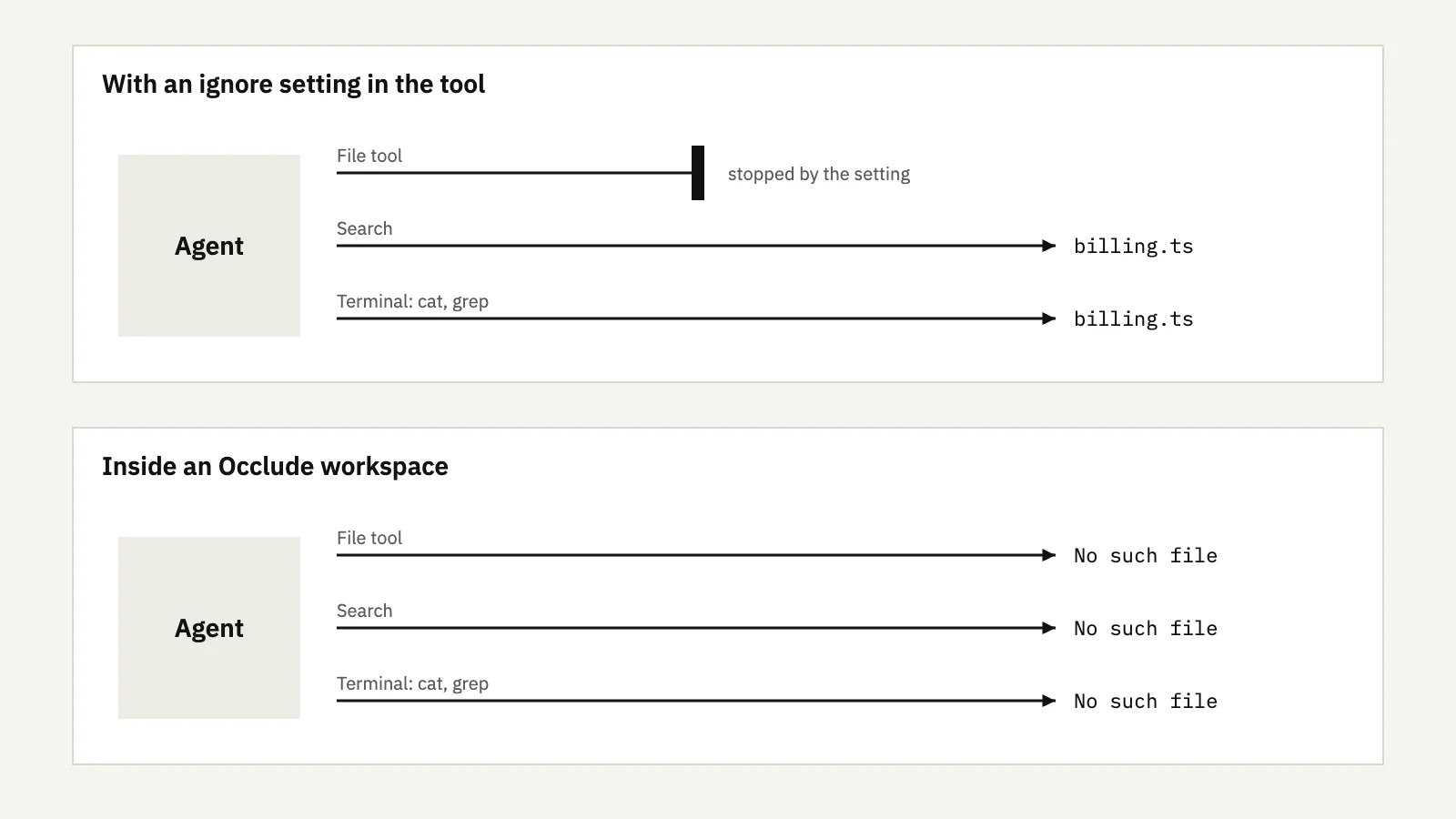
An agent does not only read files through its own file tool. It runs shell commands, writes and runs scripts, and calls other tools. A rule that filters the file tool does nothing about a script that opens the same path directly. Copilot and Cursor say so themselves.
What each tool documents
| Tool | What it offers | What its documentation says about the limit |
|---|---|---|
| GitHub Copilot | Content exclusion by path, set by an organization | "not a filesystem security boundary" |
| Cursor | An ignore file | "complete protection isn't guaranteed" |
| Claude Code | Operating-system controls that deny reads by path, which an organization can require for every developer | It covers shell commands; the built-in file tools follow separate permission rules |
GitHub Copilot. Organizations can exclude paths from Copilot. The documentation is direct about what that is:
"Content exclusion is not a filesystem security boundary and cannot guarantee prevention of every form of file access."
It adds that Copilot "may use semantic information from an excluded file if the information is provided by the IDE indirectly", such as type information and hover-over definitions. For agents, it says exclusion checks file paths in commands and scripts before running them, "but might not detect indirect file access".
Cursor. Cursor reads an ignore file. Its documentation states two limits. First: "The terminal and MCP server tools used by Agent cannot block access to code governed by .cursorignore". Second:
"While Cursor blocks ignored files, complete protection isn't guaranteed due to LLM unpredictability."
Claude Code. Claude Code goes furthest of the three. It can use the operating system to stop the shell commands the agent runs from reading paths you name, and its documentation describes how an organization can require that for every developer through managed settings, delivered by device management or from Anthropic's servers.
The same documentation is clear about the edge: these controls wrap shell commands. The agent's built-in file tools run outside them and follow separate permission rules, so both need configuring.
None of this is a criticism of the tools. Each is clear about what it covers. What none of them can change is the gap in the next section: on one machine, a file the agent cannot read is a file the build cannot read either.
What does hold
- Do not give the agent the files. Run it in a checkout that does not contain the protected code. This holds, and it brings back the split-repository problem: the agent cannot build or test anything that depends on what is missing.
- Deny reads at the operating system. Claude Code's controls do this, and so does running any agent as a user that cannot read the protected paths. This holds, and has the same cost: the build runs under the same denial, so it fails on the same files.
- Keep credentials out entirely. Secrets should not be in the environment an agent works in at all. This is worth doing whatever else you choose.
- Run the agent in a workspace that separates the agent from the build. The agent sees the files its task needs. The compiler and the tests see everything. This is code masking, and it is the only option on this list where the agent can still build and test its work.
How Occlude does this for agents
Occlude gives an AI agent the same partial repository access it gives a contractor.
- The repository is not on the machine where the agent runs. The agent connects to a workspace in your cloud, whether it is Claude Code, Codex or Cursor on a developer's machine or an agent started inside Occlude.
- Paths outside the agent's scope are not there. Reading, listing and searching all go through the same view. A request for a file out of scope gets the answer a missing file gets, and the attempt is recorded.
- The build still passes. Build and test commands run against the whole repository, and the agent gets the real result.
- Credentials are never present. They are not loaded into the session, so there is nothing for a redirected agent to find.
This also changes what a prompt injection can do. If a poisoned ticket or pull request tells the agent to go looking for secrets, the paths are not there to be read, and the attempt itself is the alert.
What we do not claim
- An agent that sees less may do worse on some tasks. We are measuring how much, on public tasks, and will publish the results whole.
- Occlude does not stop an agent writing bad code. It limits what the agent can read, and review gates decide what it can merge.
- Occlude is new. AI agents describes the agent workflow, and What AI coding agents' ignore settings actually block adds Devin Desktop and Codex to the comparison.
Sources
Each quotation was read on its source page on 28 November 2026.
- Content exclusion for GitHub Copilot, GitHub Docs
- Ignore files, Cursor Docs
- Claude Code documentation, for read controls on shell commands and enforcing them with managed settings
Want to go through this for your codebase?
Or write to contact@occludehq.com
Not ready to talk? Step through a session on a sample repository